Compilation
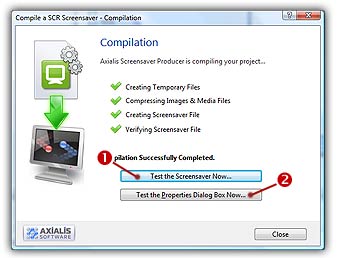
This dialog box displays the compilation process running. You can stop the compilation at any time. The Compilation dialog box looks like this:
If you work under Windows Vista or Windows 7, you'll be prompted by the Account User Control to authorize the application to install the screensaver file in Windows/System32 folder. This folder is protected so the access rights are temporary elevated to Administrator level to perform the operation. This elevation requires your authorization. Click Yes.
Compilation Process
1. You can test the screensaver fullscreen now. Click on the Test the Screensaver Now button ( ).
).
2. You can also test the screensaver Properties dialog box. See What is a screensaver topic for more info about the properties/configure dialog box (see "How to install a screensaver", button "Settings"). Click on the Test the Properties Dialog Box Now button ( ).
).
3. As you chose to install this screensaver as Windows® default (in Step 1), it will start automatically after a certain period of inactivity of your computer (depends on what you've configured in Windows® Control Panel). Click Close to finish.