How to install a SCR screensaver on a computer...
If an install procedure is provided with the screensaver, just install it launching the procedure. When a screensaver is distributed as a simple SCR file, you must follow one of the procedures below install it on a computer:
Copying the SCR file directly in the System folder
1. Copy the SCR file in your Windows system folder. This folder vary with Windows version:
Windows 95/98/ME - C:\WINNT\SYSTEM
Windows NT/2000 - C:\WINNT\SYSTEM32
Windows XP/VISTA x32/W7 x32 - C:\WINDOWS\SYSTEM32
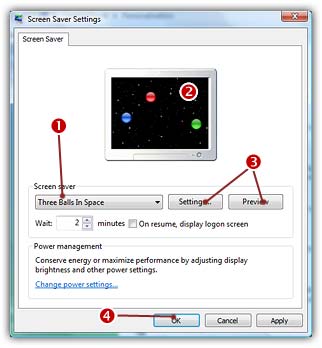
2. Right-click in the Windows Desktop background and select "Properties". A dialog box opens. Select the "Screensaver" tab:
3. Select your screensaver in the list ( ). (it should appear in this list if you copied it in the correct folder). The screensaver appears in the Preview screen (
 ).
).
4. You can adjust the screensaver settings or display it full screen ( ).
).
5. When all done, click OK ( )
)
Using Windows install procedure
1. Right-click on the SCR file. A menu opens.
2. Choose Install. The screensaver is automatically installed as the current Windows screensaver. The above dialog box is opened.
How to uninstall a screensaver?
If an uninstall procedure is provided with the screensaver, just uninstall it launching the procedure. When a screensaver is distributed as a simple SCR file, you have to locate the SCR file and delete it. You can also choose another screensaver (or simply specify "None") in the above list ().
If the screensaver has been installed with an Axialis installation procedure, an uninstall entry has been added in the Windows control panel and in the Start menu. Locate the screensaver and choose the uninstallation procedure.