Customize your Screensaver Illustration Image
In relation to Axialis Screensaver Producer, this article offers information on the following topics:
About the Screensaver Illustration Image ?
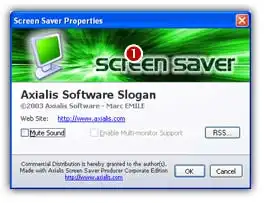
A screensaver contains a Customize dialog box (see What is a screensaver). You can customize the illustration image that is included in this window 1.
What kind of images can I use to customize my screensaver?
To be compatible with the customization feature, the image file must have the JPEG, BMP or PNG format. Also, we recommend you to use an image with the following dimension: Width = 400, Height = 90.
How to create my illustration image?
Create this image using an external application like Photoshop (professional tool), Paint Shop Pro (shareware tool) or Gimp (free tool).
A screensaver is a program (see What is a screensaver). Therefore, it contain an icon. This icon is used to display it in Windows Explorer or when you create a Shortcut to it in the Desktop for example. A standard icon is used but it's now possible to customize it.
Customize the screensaver image
1. Once your compatible icon is ready and saved in as an ICO file on your disk, open your screensaver project. Compile it either as SCR or as Install Package. Choose Project/Compile an Installable Screen Saver File (Shift+F4) or Project/Compile a Screen Saver File (F4).
2. The first dialog box of the compilation wizard opens. Follow the procedure until Step 3 "Screensaver Customization" if you choose to compile a SCR file (see below) or until Step 5 if you choose to create an install package.
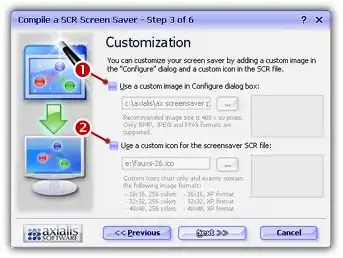
3. Click on the option Use a custom image in Configure dialog box to activate it 1. The edit fields below are automatically enabled.
4. In the edit zone, enter the full path to your image file on your disk or click the [...] button to browse your disks and locate the file using a standard Windows dialog box.
5. Once the pathname has been entered you see a preview of the image in the window on right.
6. If this is the right image, click Next. You can continue the compilation wizard. Finish the compilation and test it to see if the image has been properly changed.
Note
You can also customize the image of the install EXE file if you have chosen to create an installation package. The procedure is similar and the image should be 500x60 pixels. Click on the Advanced Customization button in Step 2 of the compilation wizard.