 ). The associated dialog box appears (see below).
Lesson 2.2 - Defining the background
In this lesson, we'll customize the screensaver background.
Change the background: Gradient background
1. In the project window click on the Background tab (). The associated dialog box appears (see below).
2. Currently, the "Solid Color" background is selected. We'll define a gray gradient background. Select the Gradient background type by clicking on the small option bullet ( ).
).
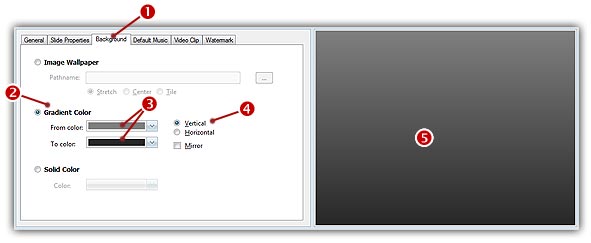
3. In the From Color field ( ), click on the down arrow (on right). A drop-down list with several colors appears. Click on the "Gray-50" color (row 3, right column). In the To Color field (), click on the down arrow (on right). The same color list appears. Click on the "Dark Gray" color (row 1, right column).
4. On the right side of the Gradient group, you see some additional options. Select the Vertical option ( ). If you followed correctly the instructions, the preview window on right should display a nice dark gray gradient background (
 ).
).