Change the Editor Drawing Area Aspect
In relation to Axialis IconWorkshop, this article offers information on the following topics:
Change the Chessboard Texture of the Transparent Areas
1. Choose Edit/Preferences or press "F2". A dialog box opens, choose the Editor tab:
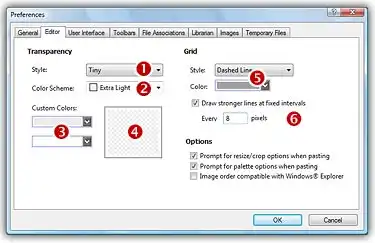
2. You can modify the size of the Transparency chessboard squares 1. Then, to change the colors of the texture you can either select a predefined scheme 2 or choose custom colors 3. You can see the changes in the preview area 4.
3. When done, click OK.
Change the Grid Aspect
1. Choose Edit/Preferences or press "F2". A dialog box opens, choose the Editor tab (see above picture).
2. Change the Grid aspect in the related group 5. To finish, you can activate or deactivate a feature which permits to draw stronger (darker) lines at fixed intervals. By default this interval is 8 6.
3. When done, click OK.