Getting Started
This chapter helps you install IconGenerator and complete the first-run steps.
System requirements
IconGenerator is available for Windows and macOS.
Windows Version
Compatible with Windows 7, 8/8.1, 10, and 11
Available in 64-bit and 32-bit
Intel i5 class CPU — 2.3 GHz+
True color GPU and display 1920×1200
8 GB RAM
Windows 7 or later
macOS Version
Will support 64-bit Intel and Apple silicon (ARM) Macs
Any 64-bit Intel-based Mac
macOS 10.13 (High Sierra) or later
Note
System requirements may change between releases. Refer to the product page or download page for the latest information.
Install IconGenerator
Download the installer for your operating system.
Run the installer.
Follow the installation wizard (including accepting the license agreement).
First launch
When you launch IconGenerator for the first time, you’re prompted to sign-up (register). This is optional, but recommended. You can sign-in/sign-up later from the Account menu. This will create a new Axialis ID account on our website.
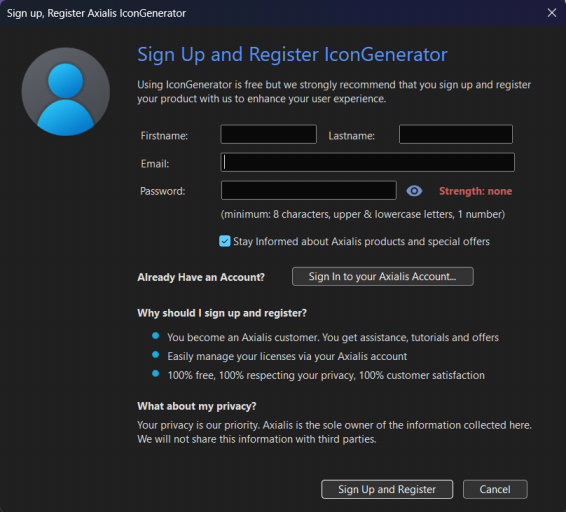
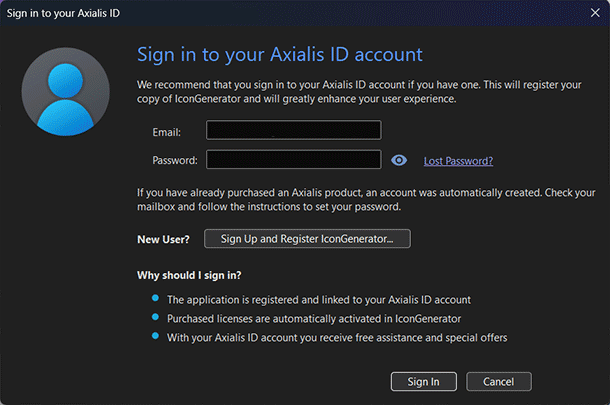
If you already have an Axialis ID account, click “Sign-in to your Axialis Account”. A new dialog box opens to enter your credentials. If you have icon sets already licensed, they will be automatically activated:
Note
If you don’t want to sign-up (register) or sign-in now, you can do it later manually.
When done, you can start generating icons immediately:
Choose an icon set in the left panel.
Select one or more icons in the icon list.
(Optional) Select one or more overlays.
Note
Some icon sets are available for free and can be used without limitation. Icon sets that require a commercial license must be purchased to unlock full functionality. Without license activation, exports are restricted to bitmap formats at a 1:1 scale.
Updating IconGenerator and the icon database
IconGenerator can update the application and the icon database automatically. You can also trigger a manual update check from the main toolbar or the Help menu.
Tip
If your icon sets are missing or appear outdated, run a manual update check first.